
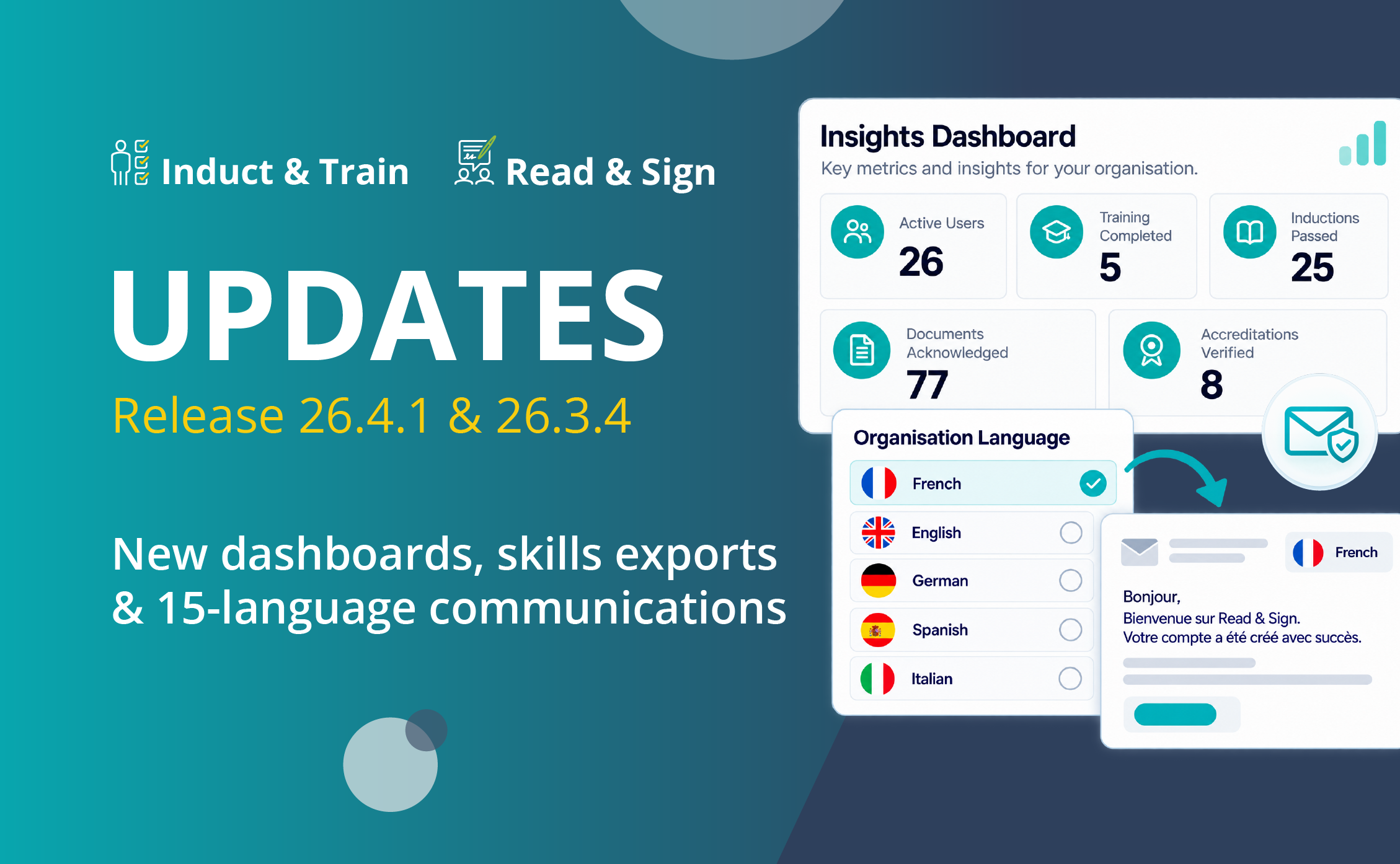
Release 26.4.1 & 26.3.4: New Features for Induct & Train and Read & Sign
The latest updates bring new features to both Induct & Train and Read & Sign, making it easier to review workforce activity, manage job role requirements and communicate with employees and contractors.
Here’s everything you need to know.
Contact one of our specialists to discover how these new features can support your team.
Induct & Train:
Read & Sign:
- Expanded Multilingual Email Support
- Improved Notice Management and Automatic Archiving
- New Group Membership Export
Summary of the Latest Updates
For Induct & Train, Release 26.4.1 introduces refreshed dashboards that give administrators a clearer view of induction and training activity. A new Insights Dashboard brings together key user figures and recent platform activity, while the Exportable Skills Matrix makes it easier to review the requirements associated with different job roles.
For Read & Sign, Release 26.3.4 introduces expanded language support for system-generated communications, helping organisations communicate more clearly with international workforces. Improvements to notice management, including automatic archiving, help keep communications organised, while the new Group Membership Export makes it easier to review user assignments and maintain records for audits.
Induct & Train Updates
Refreshed Inductions and Training Dashboards
Administrators can now access refreshed Inductions and Training Dashboards, making it easier to review key workforce information and keep track of activity across the platform.
The Inductions Dashboard provides an overview of active users, locked, expired and incomplete user profiles, and companies requiring renewal. Administrators can also review induction activity over the previous 12 months, including the number of inductions taken and pass/fail results by module.
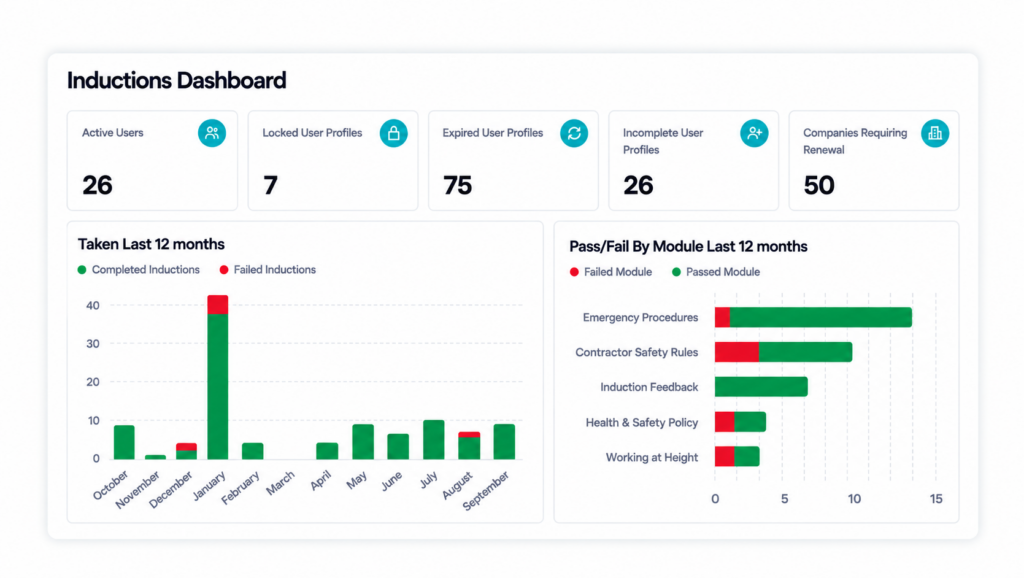
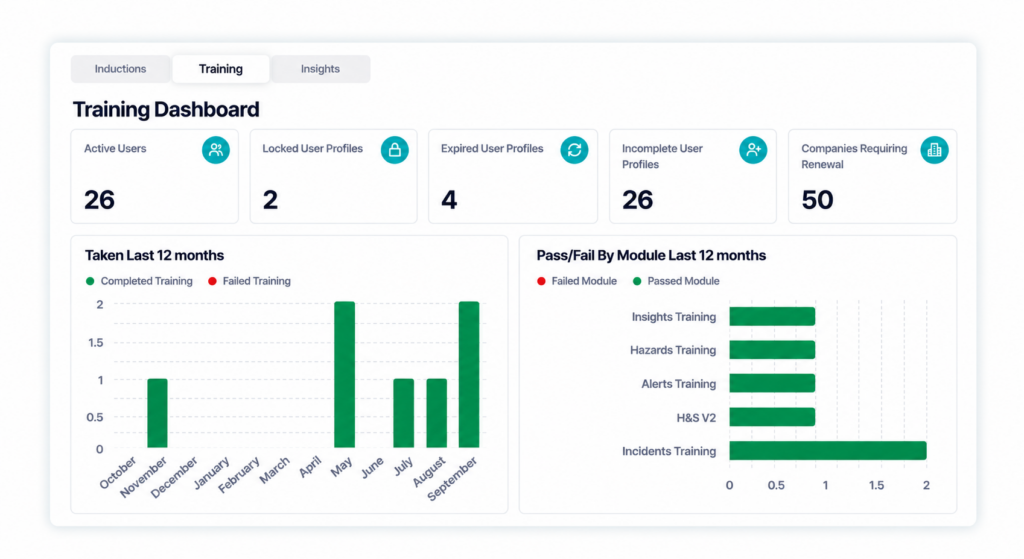
The Training Dashboard provides a similar overview of training activity, with key user figures and charts showing training taken over the previous 12 months and pass/fail results by module.
New Insights Dashboard
Alongside the refreshed dashboards, a new Insights tab gives administrators a broader overview of how Induct & Train is being used across their organisation.
The dashboard displays key figures, including licence count, active users and total users, alongside a summary of platform activity over the previous 90 days.
This includes inductions passed, training completed, new users, logins, documents acknowledged, ePermits completed, forms completed and accreditations verified.
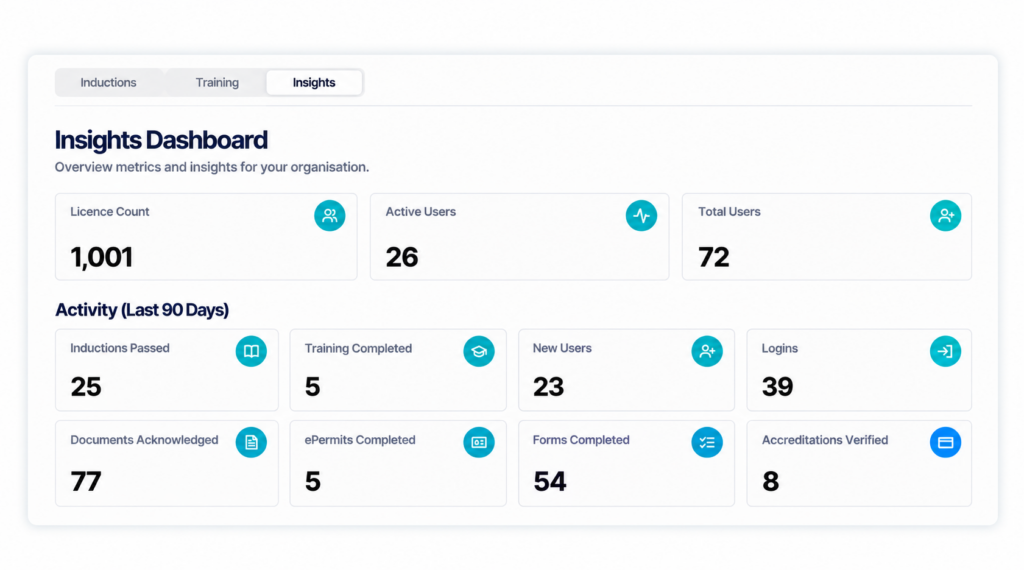
Together, these dashboards make it easier to review activity, identify areas that may need attention and access important information without checking multiple areas of the platform.
How it helps your team:
- Review induction and training activity more easily.
- Access key user information and recent platform activity in one place.
- Identify user profiles and requirements that may need attention.
- Save time when checking workforce information.
New Exportable Skills Matrix
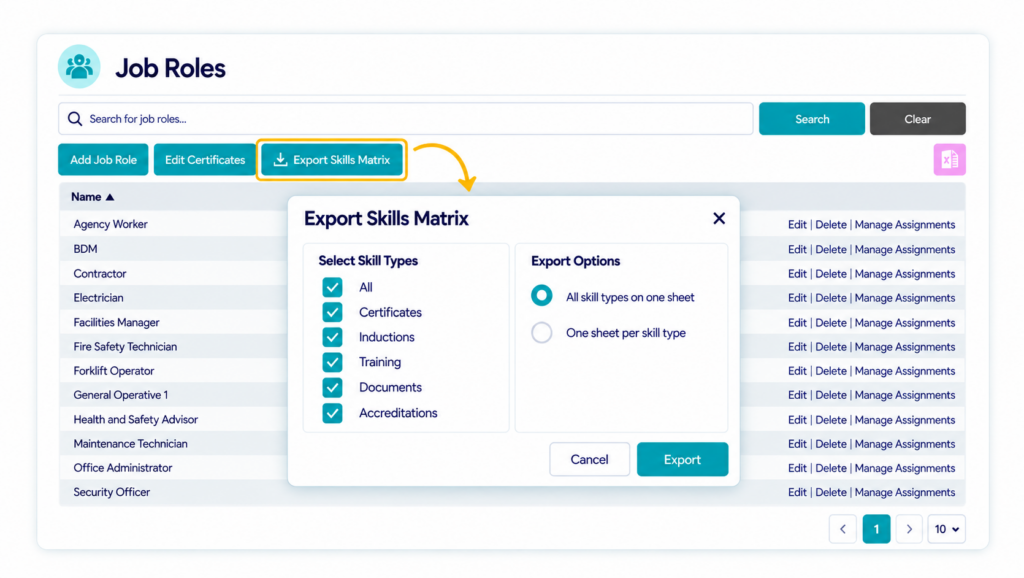
Administrators can now export job role requirements directly within the Job Roles module in Induct & Train using the new Exportable Skills Matrix.
The feature brings together the qualifications and other requirements associated with different job roles, including certificates, inductions, training, documents and accreditations.
Administrators can choose which requirement types to include and download the information into Excel, either on one worksheet or across separate worksheets for each requirement type.
This makes it easier to compare requirements across different roles and prepare information for internal reviews or audits, without having to open each job role individually.
How it helps your team:
- Export job role requirements into Excel.
- Review qualifications, training and accreditations across different roles.
- Choose which requirements to include in your export.
- Reduce the time spent checking individual job roles.
The new export builds on the existing Job Roles functionality, which allows administrators to manage the requirements associated with different roles across their organisation.
Want to learn more? Explore our Job Roles module page to see how Induct & Train can help you manage workforce requirements.
Read & Sign Update
Expanded Multilingual Email Support
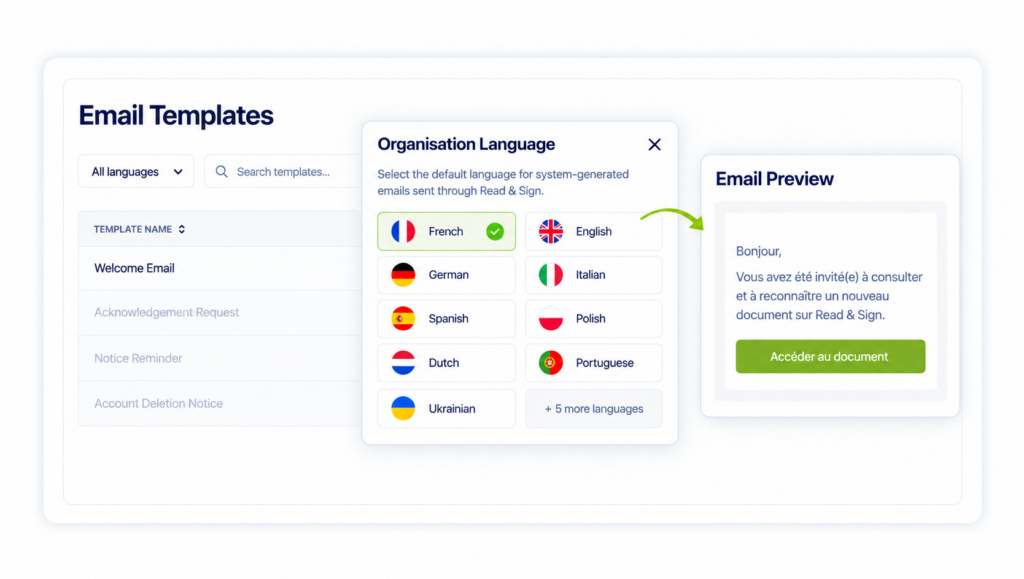
Read & Sign now offers expanded language support for system-generated emails and other notifications, helping organisations communicate more effectively with international workforces.
System-generated emails and other supported communications are now available in 15 additional languages, alongside English and French, making important account information and notifications easier for employees and contractors to understand.
The supported languages include:
Bulgarian, Czech, Dutch, German, Greek, Hungarian, Italian, Latvian, Lithuanian, Polish, Portuguese, Romanian, Slovenian, Spanish and Ukrainian.
This builds on the existing email template functionality and helps organisations provide clearer communication for employees and contractors working across different countries.
How it helps your team:
- Make important system emails easier for international users to understand.
- Support communication across multilingual workforces.
- Provide a more accessible experience for employees and contractors.
Improved Notice Management and Automatic Archiving
Read & Sign also introduces improvements to how notices are organised and managed, helping administrators keep track of important communications.
Updates to notice sorting and column layouts make it easier for administrators to navigate notice lists and find the information they need.
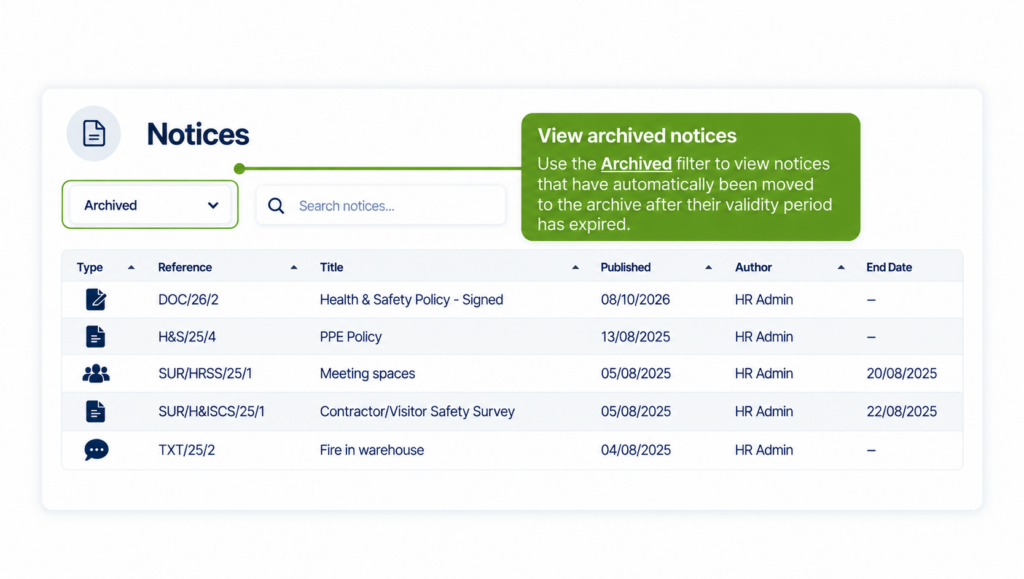
Notices are now automatically moved to the archive when their validity period expires, reducing the need for manual administration and helping keep active notice lists organised.
Archived notices remain accessible through the Archived filter, making it easy to refer back to previous communications whenever needed.
Want to explore more? Discover the Read & Sign Notices module.
How it helps your team:
- Find and manage notices more easily.
- Keep active notice lists organised without manual archiving.
- Access previous notices whenever needed through the Archived filter.
New Group Membership Export
Keeping track of who belongs to each group is important, particularly when managing larger teams or preparing information for audits.
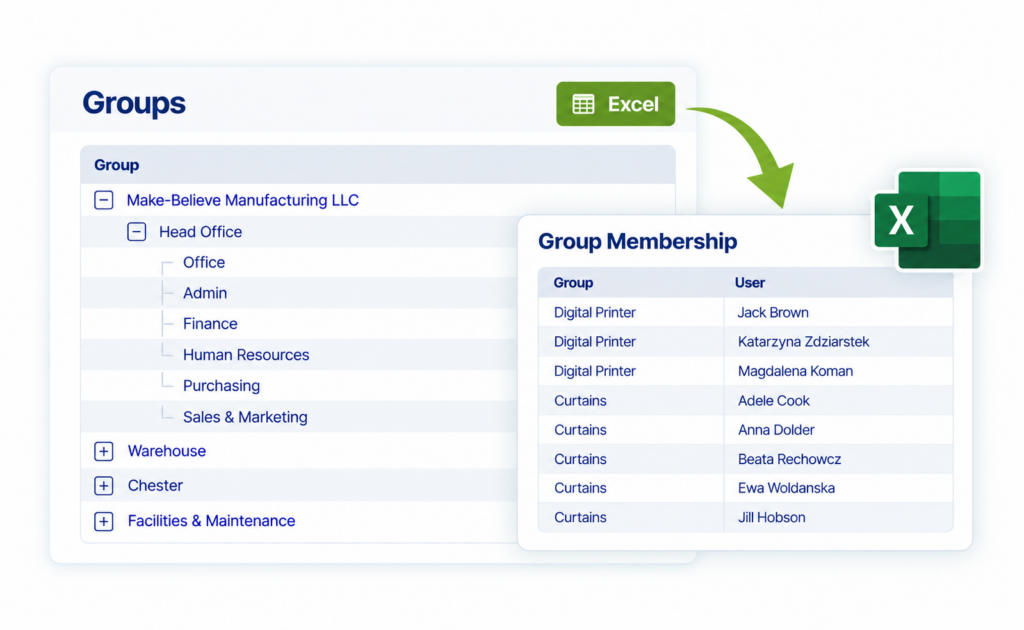
With Read & Sign Release 26.3.4, administrators can now export group membership data directly into Excel, making it easier to review how users are organised across different groups.
The new Excel export option is available in the Groups section and generates a spreadsheet showing group names alongside their assigned users.
This gives organisations a straightforward way to check group memberships, share information with colleagues and maintain accurate records for audits.
How it helps your team:
- Export group membership data directly into Excel.
- See which users are assigned to each group.
- Review group memberships and identify any changes needed.
- Save time gathering information for reporting and audits.
Looking to improve communication across your workforce? Talk to our specialists today.
Want to see for yourself?
If you’d like to learn more about how the latest Induct & Train and Read & Sign features can support your organisation, please get in touch with our team.


